Abundera Sign API
Create the most provable e-signatures with cryptographic proof. Hash-chained audit trails, RFC 3161 timestamps, GitHub evidence anchoring, signer evidence scoring, signing ceremony proof, AI contract summaries, webcam identity capture, browser GPS, court-ready declarations, and public document verification, all through a simple REST API.
https://sign.abundera.aiQuick Start
Send a document for signature in one API call:
POST /api/v1/envelopes
Authorization: Bearer <jwt_token>

{
  "template_id": "nda-simple",
  "signers": [
    { "email": "signer@contoso.com", "name": "Jane Doe", "role": "recipient" }
  ],
  "fields": {
    "disclosing_party_name": "Acme Corp",
    "effective_date": "2026-03-15"
  }
}
The signer receives an email with a secure link. When they sign, you get an HMAC-signed webhook. The completed PDF includes a Certificate of Completion, cryptographic proof page with hash-chain visualization, signer evidence scores, RFC 3161 timestamp, and a tamper-evident seal on every page.
API Resources
Well-known discovery
Auto-discovery endpoints under /.well-known/ (RFC 8615):
Authentication
The API supports two authentication methods for authenticated endpoints: JWT Bearer tokens and product-scoped API keys.
JWT Tokens
Obtain a JWT from the Abundera auth service. JWTs are verified against the JWKS endpoint at https://abundera.ai/v1/auth/jwks.
Authorization: Bearer eyJhbGciOiJSUzI1NiIs...
API Keys
API keys use the abnd_sign_* prefix and are passed as Bearer tokens. Create and manage API keys in the Abundera dashboard.
Authorization: Bearer abnd_sign_xxx...
API keys are product-scoped, each key is tied to Abundera Sign specifically. Keys are validated server-side against abundera.ai/v1/auth/validate-key and cached in KV for 60 seconds. Authenticated users (JWT or API key) receive 2× the per-IP rate limits. API keys are available on all tiers.
Scopes and presets
Every key carries a scope list; each endpoint requires the matching scope or the request returns 403. Scopes follow resource:action (write implies read; envelopes:manage implies write). Sensitive scopes (evidence:export, audit:export, branding:write, notarizations:create, declarations:write, envelopes:manage) are never implied and must be granted directly. The full catalog is published at /.well-known/abundera-capabilities.json.
Four presets cover the common integration shapes and expand to a plain scope list when the key is created:
| Preset | Scopes | Use it for |
|---|---|---|
read_only | envelopes:read templates:read signers:read contacts:read | Reporting and dashboards |
send_and_track | envelopes:write templates:read contacts:read evidence:export | Send envelopes, track status, download signed documents |
automation | envelopes:write templates:write signers:write webhooks:write contacts:read evidence:export | Headless pipelines and embedded signing |
full_access | sign:full_access | Account-owner keys only; grants every scope including sensitive ones |
Token Refresh
Access tokens are short-lived. Use the refresh endpoint to obtain new tokens without re-authenticating:
Exchange a refresh token for a new access token and refresh token pair.
| Field | Type | Description |
|---|---|---|
| refresh_token required | string | The refresh token from your last authentication |
{
  "ok": true,
  "data": {
    "access_token": "eyJhbGciOi...",
    "refresh_token": "rt_abc123...",
    "expires_in": 900,
    "token_type": "Bearer"
  },
  "request_id": "req_…"
}
Plan Tiers
Some endpoints and features require a specific plan tier. If your plan doesn't include access, you'll receive a 403 response with an upgrade_url.
| Plan | Tier Level | Key Features |
|---|---|---|
| Starter | starter | Core API, webhooks, hash-chained audit trails, RFC 3161 timestamps, Certificate of Completion, identity scoring, ceremony proof, access codes, auto reminders, public verification, bot detection |
| Professional | professional | + Bulk send, signing order, SMS OTP, AI summaries, geo-lock, identity photo capture, browser GPS, comments, court-ready declarations, custom email branding |
| Business | business | + Template CRUD, audit export, VPN/proxy blocking, custom retention (99yr), white label |
products.sign (per-product tiers, since each Abundera product has an independent subscription). The API checks this automatically, no extra headers needed. If products.sign is absent, the API falls back to Starter.Auth Types
| Type | Used By | Description |
|---|---|---|
JWT | Envelope management | Bearer token in Authorization header |
API Key | Envelope management | abnd_sign_* Bearer token in Authorization header |
Token | Signing flow | Signing token in request body or URL |
Public | Verification | No authentication required |
Secret | Cron jobs | Authorization: Bearer <CRON_SECRET> header |
Signing IDs
Signing request emails use opaque sgn_xxx IDs instead of raw hex tokens for improved security. These IDs are used in signing URLs:
https://sign.abundera.ai/sign/#t=sgn_xxxxxxxxxxxxxxxx
The ID sits in the URL fragment, so it never reaches a server log. The page sends it to the API in the X-Sign-Token header. Older links with ?token=sgn_xxx still work until they expire, but that form is deprecated.
| Property | Details |
|---|---|
| Format | sgn_ prefix + 16 alphanumeric characters (20 chars total) |
| Entropy | ~4.7×1028 possible values |
| Lifetime | One-time use, automatically revoked after signer completes signing |
| Storage | verification_ids table with owner_type = 'signing' |
| Backward compatibility | Legacy raw hex tokens are still accepted |
Verification IDs
Public documents use opaque vrf_xxx IDs instead of raw UUIDs. QR codes embedded in sealed PDFs link to the verification page using these IDs:
https://sign.abundera.ai/verify/?id=vrf_xxxxxxxxxxxxxxxx
The /api/v1/verify endpoint supports three lookup methods:
| Method | Parameter | Auth Required |
|---|---|---|
vrf_xxx ID | ?id=vrf_xxx | None (public) |
| Raw UUID | ?id=e3f8a1b2-... | JWT required |
| SHA-256 hash | ?hash=a1b2c3... | None (self-gating, requires knowledge of the hash) |
Errors
All errors return JSON with an error field. HTTP status codes follow standard conventions:
| Code | Meaning |
|---|---|
| 400 | Invalid request, check required fields |
| 401 | Missing or invalid JWT |
| 403 | Forbidden, not the envelope sender, or gate required |
| 404 | Resource not found |
| 409 | Conflict, already signed/declined |
| 410 | Gone, document voided or expired |
| 429 | Rate limited or tier limit exceeded |
| 500 | Internal server error |
// Every JSON response uses the same envelope.
// Success (2xx):
{
  "ok": true,
  "data": { /* the resource */ },
  "request_id": "req_…"
}

// Error (4xx/5xx):
{
  "ok": false,
  "error": {
    "code": "validation_error",
    "message": "envelope_id is required"
  },
  "request_id": "req_…"
}
The error.code is a stable machine-readable value (validation_error, unauthorized, forbidden, not_found, conflict, gone, rate_limited, payment_required, internal_error); branch on it rather than the human-readable message. The request_id (also returned as the X-Request-ID header) is present on every response. Quote it in support requests. Binary downloads (signed PDF, evidence, timestamp) return the file directly, not the envelope.
Rate Limiting
API requests are rate-limited per IP address. Authenticated requests (JWT or API key) automatically receive 2× the per-IP limits using the user's identity as the rate-limit key. When rate-limited, you'll receive a 429 response.
| Endpoint | Limit |
|---|---|
| General (all endpoints) | 30/min per IP (60/min for authenticated users) |
POST /api/v1/envelopes | 10/min |
POST /api/v1/orgs | 5/min |
POST /api/v1/demo-envelope | 1/min |
GET /api/v1/document-summary | 5/min |
GET /api/v1/verify | 10/min |
GET /api/v1/document-pdf | 3/min |
POST /api/v1/envelopes allows 20/min for authenticated users.Monthly API Key Allowance
On top of the burst limits above, each API key has a monthly call allowance tied to your plan. Every authenticated call with the key counts toward it; the counter resets at the start of each calendar month (UTC). When the allowance is exhausted you'll receive a 429 with Retry-After set to the next reset.
| Plan | Calls per key per month |
|---|---|
| Starter | 10,000 |
| Professional | 100,000 |
| Business | 1,000,000 |
Every API-key response carries the allowance state in the standard rate-limit headers: the "api_key" entry in RateLimit-Policy / RateLimit shows the cap, remaining calls, and seconds to reset, and X-RateLimit-Limit / X-RateLimit-Remaining / X-RateLimit-Reset reflect the tightest active bucket. Need a higher allowance? Contact support.
Spend Controls
Charges beyond your subscription follow two models, and each has its own guard:
- Prepaid (its own hard cap): verification credits (SMS, ID verification, KBA) and pay-as-you-go envelope packs are bought up front — spend can never exceed what you've purchased.
- Metered envelope overage (budgeted, off by default): envelopes beyond your plan and packs can bill automatically at your plan's overage rate, but only after you set a monthly budget — the default is $0, so nothing ever bills without you turning it on. Once a budget is set you get an email at 80%, and at 100% metered overage pauses until the next calendar month (UTC). Included envelopes and prepaid packs keep working either way.
Read or change the budget with GET/PUT /api/v1/billing/budget. Set it to 0 for strict prepaid mode (no metered overage at all), or null to return to the plan default.
Both guards alert before they bite: you get an email at 80% of the overage budget, and another when prepaid verification credits run low, so signers are never blocked mid-ceremony by surprise.
What Gets Hashed — and How to Verify It Yourself
Every sealed document ships with an evidence package designed so that anyone can independently recreate every hash and verify every signature, with no trust in us required. The structure:
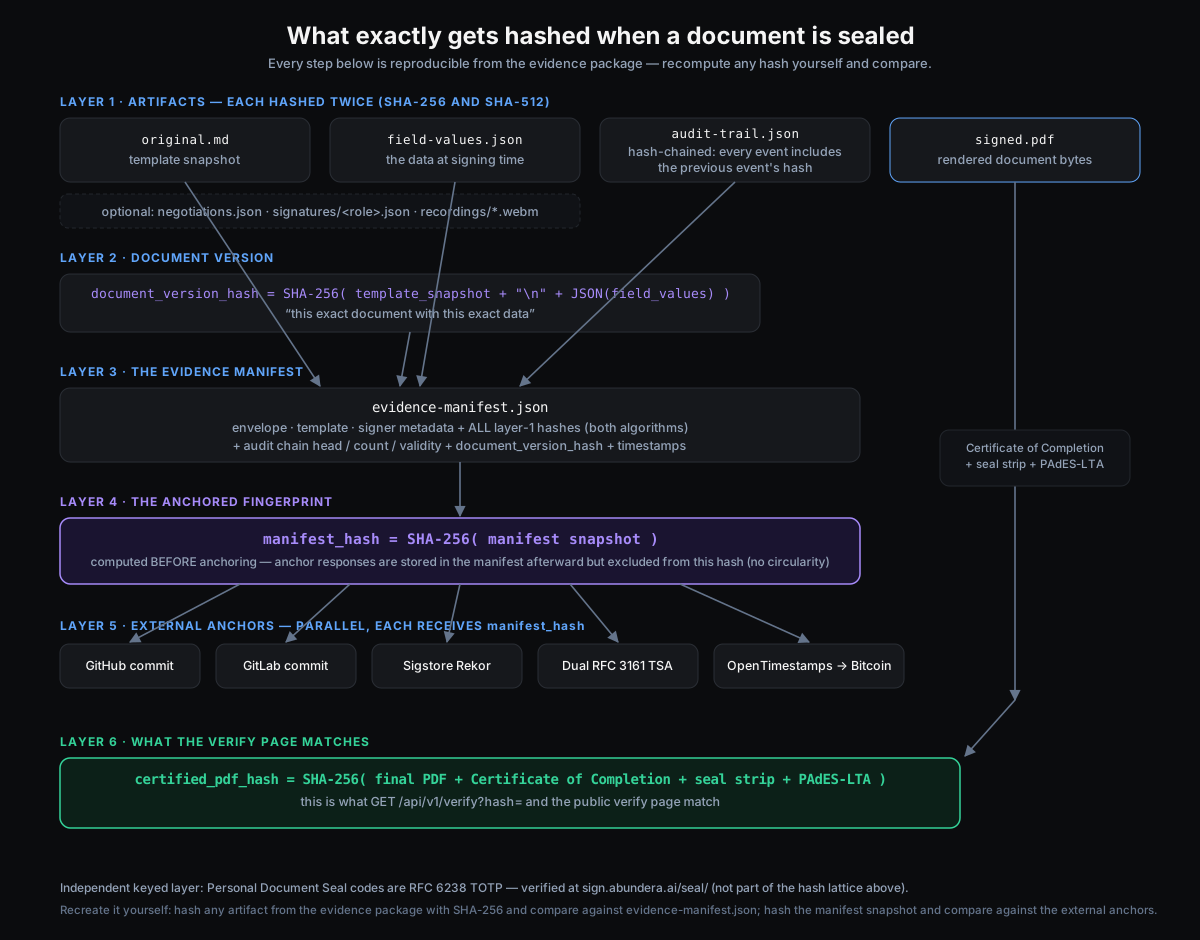
To recreate it yourself: download any artifact from the evidence package and hash it with SHA-256 (and SHA-512); it must equal the entry in evidence-manifest.json. Hash the manifest snapshot and compare it against the external anchors (the GitHub/GitLab commits, the Sigstore Rekor entry, both RFC 3161 timestamp tokens, and the OpenTimestamps Bitcoin attestation all carry the same manifest_hash). Hash the final PDF and check it with GET /api/v1/verify?hash=, the same check the public verify page runs. The audit trail is internally hash-chained, so any inserted, removed, or altered event breaks the chain. The Personal Document Seal's rolling codes are an independent RFC 6238 (TOTP) layer verified at /seal/. The Quick Start's “Verify a signed document” operation shows this end-to-end, with copy-paste snippets in every major language.
The manifest lists every artifact, so the verify loop covers the full history of the agreement, not just the final page; there is no fixed set to remember:
- Clause negotiations — when parties redline clauses,
negotiations.jsonrecords each flag, proposal, counter, and resolution. Applying an agreed change re-versions the document to a per-envelope copy and voids any signature made against the older text into a fresh re-consent round, so a signature always binds the exact wording it was made on. - Messages — signer↔sender correspondence is captured in
messages.json, explicitly marked"binding": false: a complete record of what was said, that can never be mistaken for a term of the agreement. - Document amendments — if the sender edits the document while signing is in progress, the hash-chained audit trail records a
document_correctedevent carrying the before and after document hashes, plus asignature_voided_by_amendmentevent for every signature that was voided for re-consent. Any post-send change to the text is therefore provable, attributable, and timestamped — and the sealedoriginal.mdis exactly the wording that was ultimately signed.
Page and Line Citations
The document a signer reads in the browser and the sealed PDF break pages at the same points, verified template-by-template across Chrome, Safari, and Firefox. A citation like "page 3, paragraph 2" refers to the same content whether someone is looking at the signing preview or the certified PDF.
For line-level citations, the evidence package includes line-map.json: a record of where every body line of signed.pdf sits, giving its line number, page, vertical position, and the source line in original.md it was rendered from. The map is hashed in evidence-manifest.json like every other artifact, so "page 3, line 14" resolves against the sealed document itself, the way line numbers work on pleading paper. Documents created with metadata.line_numbers also print every fifth line number in the margin, in both the signing preview and the PDF.
Webhooks
Abundera Sign sends Standard Webhooks to your callback_url for envelope and signer lifecycle events. Each delivery carries the webhook-id, webhook-timestamp, and webhook-signature headers and a { id, type, timestamp, data } body. Configure per-envelope callbacks or use global webhooks for all envelopes.
POST {callback_url}
Content-Type: application/json
webhook-id: msg_2b1c...
webhook-timestamp: 1717900000
webhook-signature: v1,K5oZ...

{
  "id": "msg_2b1c-...",
  "type": "envelope.completed",
  "timestamp": "2026-03-05T12:00:00Z",
  "data": {
    "envelope_id": "abc-123-...",
    "completed_at": "2026-03-05T12:00:00Z"
  }
}
Webhook Event Types
| Event | Description |
|---|---|
signer.viewed | Signer opened the signing page |
signer.signed | Signer completed their signature |
signer.declined | Signer declined to sign with a reason |
signer.delegated | Signer delegated signing to another person |
envelope.completed | All signers completed, sealed PDF and evidence package generated |
envelope.voided | Sender voided the envelope |
envelope.expired | Envelope passed its expiry date without completion |
envelope.extended | Signing deadline extended; an expired envelope is revived and active signers are re-notified |
payment.completed | Stripe payment gate completed by signer |
clause.flagged | Signer flagged a clause for negotiation |
clause.responded | Sender responded to a clause negotiation flag |
clause.accepted | Clause negotiation accepted by both parties |
clause.applied | Agreed clause text applied to the document; signatures re-collected |
clause.counter_proposed | Signer submitted a counter-proposal to a clause response |
clause.withdrawn | Signer withdrew their own open clause flag |
notarization.completed | Remote online notarization session completed |
notarization.failed | Remote online notarization session failed or was cancelled |
notarization.expired | Remote online notarization session expired before completion |
signer.idv_verified | Signer passed provider ID verification |
signer.idv_failed | Signer's ID verification was declined or not approved |
signer.kba_failed | Signer failed knowledge-based authentication (KBA) |
signer.otp_locked | Signer locked out after repeated SMS OTP failures |
signer.blocked | Signer blocked by a signing gate (geo/VPN, access-code lockout, SMS send cap, KBA/IDV attempt caps, or exhausted verification credits) — payload carries gate and reason |
signer.email_bounced | An email to the signer (invitation, reminder, or completion copy) bounced or drew a spam complaint — payload carries bounce_type and template_alias |
envelope.retention_expiring | A completed envelope's evidence purges within 30 days (retention boundary warning) — payload carries purge_date |
envelope.purged | Retention period completed; the signed PDF, evidence package, and signer data were permanently erased |
signer.attachment_uploaded | Signer uploaded a supporting attachment |
payment.declined | Pay-to-sign or overage charge was declined |
envelope.expiring | Envelope nearing expiration without completing (sender digest) |
Verifying Webhook Signatures
Sign the content {webhook-id}.{webhook-timestamp}.{rawBody} with HMAC-SHA256 using your whsec_ secret (base64-decoded), then compare against each space-delimited token in the webhook-signature header using a constant-time comparison. Reject deliveries whose webhook-timestamp is more than 5 minutes from now, and dedupe on webhook-id.
// Node.js verification example (Standard Webhooks)
const crypto = require('crypto');
const key = Buffer.from(secret.replace(/^whsec_/, ''), 'base64');
const signedContent = `${webhookId}.${webhookTimestamp}.${rawBody}`;
const expected = 'v1,' + crypto
  .createHmac('sha256', key)
  .update(signedContent)
  .digest('base64');
const valid = webhookSignature
  .split(' ')
  .some((sig) => sig.length === expected.length &&
    crypto.timingSafeEqual(Buffer.from(sig), Buffer.from(expected)));
Testing Webhooks Locally
Your callback_url has to be reachable from the public internet, so http://localhost:3000 will never receive a delivery. Put a tunnel in front of your dev server and point callback_url at the public URL it gives you.
Pair that with a test key and you get the whole loop without sending anything to a real person. Mint one in the dashboard under Settings then API keys; it carries the abnd_sign_test_ prefix. Envelopes created with a test key and test_mode: true skip every email, are not billed, store outside WORM, and auto-void after 24 hours. Because no email is sent, the create response hands you a signing_url for each signer, so you can drive a full signing ceremony yourself and watch the events land.
A production key that sends test_mode: true is rejected with a validation_error rather than quietly sending live. That is deliberate: nobody should discover they were in live mode by getting a call from a real signer.
# 1. Expose your local receiver. cloudflared needs no account:
cloudflared tunnel --url http://localhost:3000
#   → https://your-tunnel.trycloudflare.com
#   ngrok http 3000 works the same way.

# 2. Create a test envelope pointed at the tunnel.
curl -X POST https://sign.abundera.ai/api/v1/envelopes \
  -H "Authorization: Bearer abnd_sign_test_..." \
  -H "Content-Type: application/json" \
  -d '{
    "template_id": "nda-simple",
    "test_mode": true,
    "callback_url": "https://your-tunnel.trycloudflare.com/webhooks/sign",
    "signers": [{ "name": "Dev Tester", "email": "dev@example.com", "role": "recipient" }]
  }'

# 3. The response carries a signing_url per signer, since no email was sent.
#    Open it, sign, and every event above arrives at your tunnel.
Every delivery from a test envelope carries test_mode: true in its payload, so your receiver can tell a rehearsal from the real thing:
{
  "type": "envelope.completed",
  "data": {
    "envelope_id": "abc-123-...",
    "test_mode": true
  }
}
If you only want to see the payload shape and have not written a receiver yet, point callback_url at webhook.site or Svix Play. Both give you a public URL and a live view of what arrived, with nothing to install. Svix Play can also return an error code on demand, which is the quickest way to see our retry behaviour without breaking your own server.
Two things worth knowing before you debug a missing delivery. Reject any delivery whose webhook-timestamp is more than 5 minutes old, which means a tunnel you left running overnight will start refusing replays. And every attempt is recorded in the delivery ledger in the dashboard under Settings then Webhooks, so you can confirm we sent it before you go looking in your own logs.
Embedded Signing
Embed the signing experience directly in your app using an iframe. No redirects, signers complete the flow within your UI.
How it works
- Create an envelope with
embedded: true, this skips invitation emails and returnssigning_urlper signer - Embed the
signing_urlin an iframe in your app - Listen for completion via webhook (
signer.signed,envelope.completed) or poll the status endpoint
JavaScript SDK (recommended)
Load https://sign.abundera.ai/js/sdk.js and let it manage the iframe, the origin handshake, and the event callbacks:
<script src="https://sign.abundera.ai/js/sdk.js"></script>

AbunderaSign.open({
  url: signing_url,               // from POST /api/v1/envelopes
  container: '#signing-container', // omit for a modal overlay
  onReady() { /* iframe loaded */ },
  onDocumentLoaded(data) { /* { template_name, signer_name, signer_role, envelope_id } */ },
  onSigned(data) { /* { envelope_id, all_signed, download_url } */ },
  onDeclined(data) { /* { reason } */ },
  onError(data) { /* { message } */ },
});
The SDK appends parent_origin=<your origin> to the signing URL. The signing page uses it only as the postMessage target, and the SDK accepts messages only from the signing iframe's own window and origin. Framing is controlled server-side: set metadata.embed_origin (one https origin, or an array of them) when you create the envelope. The page's frame-ancestors policy is 'self' plus those registered origins; a page whose origin is not registered cannot frame it, whatever parent_origin says.
postMessage events
Every message has the shape { type: "abundera:sign", event, data }:
| Event | Data | When |
|---|---|---|
ready | {} | Signing page initialized inside the iframe |
document_loaded | template_name, signer_name, signer_role, envelope_id | Document fetched and rendered |
signed | envelope_id, all_signed, download_url | This signer completed |
declined | reason | Signer declined |
error | message | A load-time error surfaced (bad token, expired, voided) |
submit_error | message | The signing submission failed after the signer pressed Finish (validation, gate, or server error) — the host can offer its own retry UI |
JavaScript (hand-rolled iframe)
// 1. Create envelope via your backend
const res = await fetch('/your-api/create-signing', { method: 'POST' });
const { signing_url } = await res.json();

// 2. Embed in iframe (framing is allowed only from the embed_origin you registered on the envelope; parent_origin is the postMessage target)
const iframe = document.createElement('iframe');
iframe.src = signing_url + '&parent_origin=' + encodeURIComponent(location.origin);
iframe.style.cssText = 'width:100%;height:800px;border:none;border-radius:8px';
iframe.allow = 'camera;microphone';  // if using photo/video identity
document.getElementById('signing-container').appendChild(iframe);
React
function SigningEmbed({ signingUrl }) {
  return (
    <iframe
      src={signingUrl}
      style={{ width: '100%', height: '800px', border: 'none', borderRadius: '8px' }}
      allow="camera;microphone"
      title="Sign Document"
    />
  );
}
Backend: Create Embedded Envelope
// Node.js / Python / any HTTP client
const response = await fetch('https://sign.abundera.ai/api/v1/envelopes', {
  method: 'POST',
  headers: {
    'Authorization': 'Bearer abnd_sign_...',
    'Content-Type': 'application/json',
  },
  body: JSON.stringify({
    template_id: 'nda-simple',
    embedded: true,               // ← key flag
    signers: [{ name: 'Jane Doe', email: 'jane@contoso.com', role: 'recipient' }],
    fields: { disclosing_party_name: 'Acme Corp' },
  }),
});

const { data: envelope } = await response.json(); // canonical { ok, data, error, request_id }
// envelope.signers[0].signing_url → embed this in your iframe
Security Notes
- Signing URLs are single-use tokens, they are revoked after signing
parent_originis the postMessage target only;frame-ancestorscomes from the envelope's registeredmetadata.embed_origin. The SDK setsparent_originautomatically- The iframe includes all security features: access codes, SMS OTP, identity verification
- Webhooks fire normally, use
callback_urlto get notified when signing completes
See code examples and framework guides →
Signing Links
A signing link is a reusable URL that lets anyone sign a template-based document without you sending individual envelopes: share it on a careers page, in a kiosk, or over chat. Each claim creates a fresh envelope for that signer.
Lifecycle
POST /api/v1/signing-links(Professional+) with atemplate_id, optional pre-filledfields,max_uses(1-100,000), andexpiry_days(1-365). The response carries the full URL once — store it; only a hash is kept server-side.- A visitor opens the link, enters their name and email, and claims it. Claims are atomic against
max_uses(concurrent claims can never overshoot the cap) and consume your envelope allowance like any other envelope. - The signer gets the standard signing experience and email; you get the standard webhooks and dashboard visibility.
Statuses
| Status | Meaning |
|---|---|
active | Claimable |
exhausted | Reached max_uses; create a new link to keep collecting signatures |
expired | Past expires_at |
deactivated | Revoked from the dashboard or via PUT /api/v1/signing-links |
MCP Server (AI Agents)
The Abundera Sign MCP Server lets AI coding assistants interact with the Abundera Sign API through the Model Context Protocol. Works with any MCP-compatible client (Cursor, Windsurf, VS Code, and more). Send documents for signature, check envelope status, manage templates, and review audit trails, all through natural language.
Available Tools
| Tool | Description |
|---|---|
list_templates | List templates with optional category, tag, or search filters |
get_template | Get template details including fields and roles |
create_envelope | Create and send a document for e-signature |
list_envelopes | List envelopes with status, template, and pagination filters |
get_envelope | Get full envelope details including signers and audit counts |
void_envelope | Void (cancel) an envelope and notify unsigned signers |
send_reminder | Send a reminder to unsigned signers |
get_audit_trail | Get the hash-chained audit trail for an envelope |
check_usage | Check current month's envelope usage and plan limits |
Setup
Add to your MCP client configuration (e.g., mcp.json or equivalent):
{
  "mcpServers": {
    "sign-abundera": {
      "command": "node",
      "args": ["/path/to/mcp/index.js"],
      "env": {
        "ABUNDERA_SIGN_API_KEY": "abnd_sign_..."
      }
    }
  }
}
Setup for Cursor / Windsurf
Add the same configuration to .cursor/mcp.json (Cursor) or your Windsurf MCP settings file.
Example
Ask your AI assistant: "Send an NDA to jane@contoso.com using the nda-simple template with disclosing party Acme Corp"
The agent calls create_envelope:
{
  "template_id": "nda-simple",
  "signers": [{ "name": "Jane Doe", "email": "jane@contoso.com", "role": "recipient" }],
  "field_values": { "disclosing_party_name": "Acme Corp" }
}abnd_sign_* prefix). MCP server source and README ship in the @abundera/sign-mcp-server npm package.Full endpoint reference
This page covers integration guides (authentication, webhooks, embedded signing, MCP). The complete REST API reference for every endpoint lives in our interactive docs: